vLLM
vLLM is a high-throughput, memory-efficient inference and serving engine for large language models. 1Panel provides visual management capabilities on the AI -> Model -> Local Models -> vLLM page, which can be used to uniformly create, edit, start/stop, and maintain local vLLM services.
This feature requires a 1Panel Professional Edition or Enterprise Edition license.
1 Prerequisites
Before creating a vLLM service, please confirm that the following conditions are met:
- The server has installed the drivers and container runtime environment matching the selected vLLM image and accelerator device
- When using an NVIDIA GPU,
nvidia-smican normally display the graphics card information, andNVIDIA Container Toolkithas been configured - When using Intel or Ascend accelerator devices, the driver and container runtime environment have been configured according to the corresponding vendor requirements
- The model files to be loaded have been placed in the local directory of the server in advance
If you need to first check whether the GPU is available, refer to the GPU Monitoring documentation.
2 Creating a vLLM Service
After opening the 1Panel dashboard, enter AI -> Model, switch to Local Models -> vLLM, and click Create.
Fill in the vLLM deployment parameters as required by the page, then click Confirm to start creation. The creation process will be executed in the background as a task, and after completion the service status can be viewed in the list.
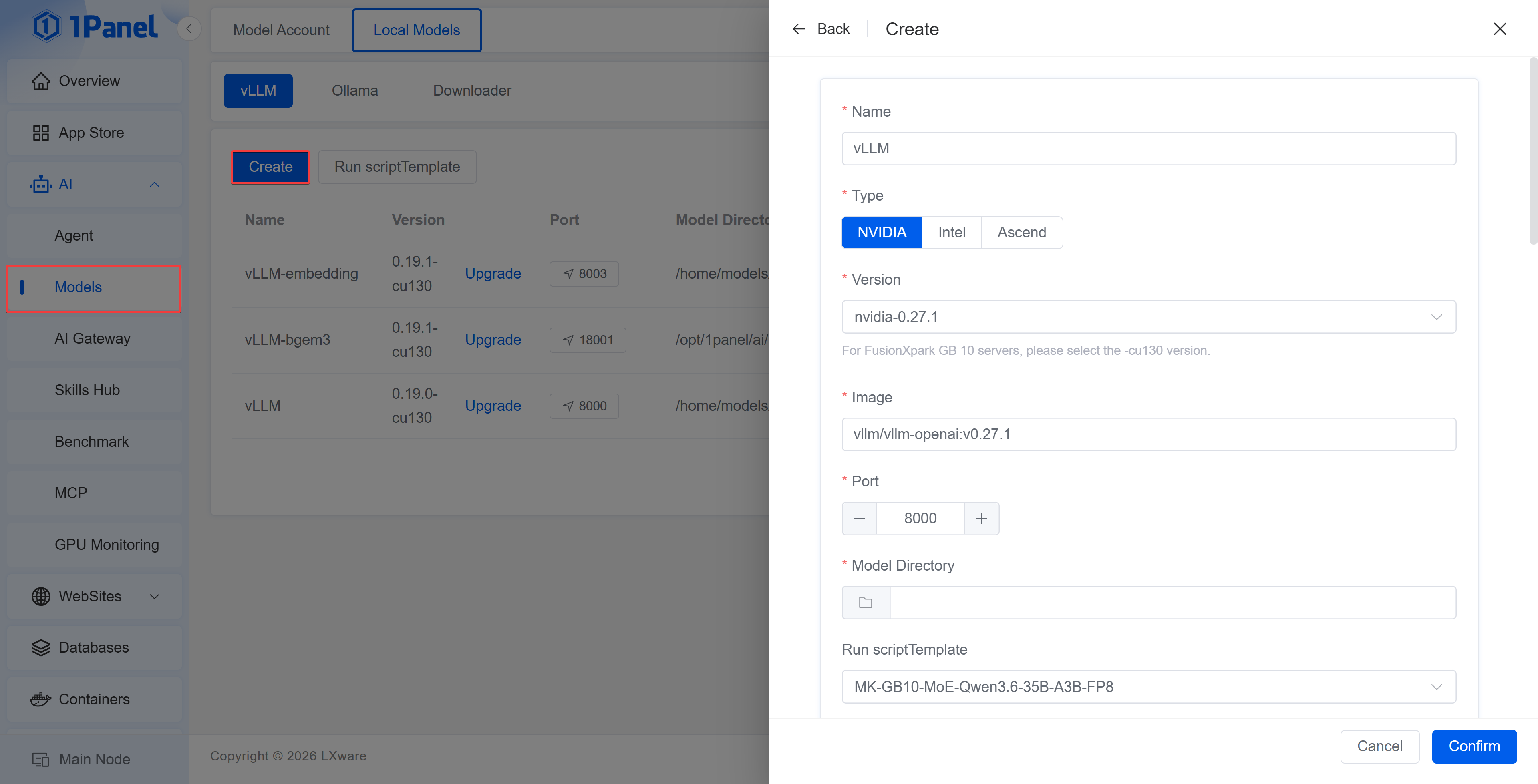
Parameter Description
- Name: The name of the vLLM service, used for list display and subsequent management
- Accelerator Device: Select the NVIDIA, Intel, or Ascend type provided on the page according to the current server hardware. The available options depend on the current version and node detection results
- Version: Select the vLLM application version to be deployed. Different accelerator devices use different images and versions
- Port: The port through which the vLLM service provides its API to the outside, with
8000available by default - Model Directory: The local model directory on the server. After selection, 1Panel will mount this directory into the container
- Startup Command: The command parameters used to start the vLLM service. After selecting the model directory, the system will automatically generate a default command based on the directory name; if there are special inference parameter requirements, you can also adjust it yourself
After the vLLM service is created, it will provide inference capability to the outside in the form of an OpenAI-compatible endpoint, facilitating subsequent integration with agents or other AI applications.
After creation is completed, the service can be synchronized as a model account for use by agents and other AI features. When synchronizing, you should confirm that the Base URL, API type, and model information are consistent with the actual service.
3 Advanced Settings
If you need to further control the container runtime, you can expand Advanced Settings.
Advanced Settings Description
- Container Name: Customizes the vLLM container name; by default it is automatically filled in following the service name
- External Port Access: After enabling, the firewall port will be opened to allow access to this service from the external network
- Bind Host IP: Used to restrict the port to bind only to a specified host address or network interface; if the purpose is unclear, it is recommended to keep the default
- Restart Policy: Configures the restart method after the container exits abnormally
- CPU / Memory Limit: Limits the host resources available to the vLLM container
- Pull Image: Actively pulls the image before startup to ensure that the image of the target version is used
- Edit Compose File: Allows manually adjusting the Compose configuration used for deployment; this option is suitable for experienced users, and improper modification may cause creation to fail
4 Daily Management
The list supports viewing the status and runtime directory, and provides operations such as edit, start, stop, restart, delete, view logs, and task tracking. Modifying the image, startup command, mounts, or resource limits may trigger container recreation; data that is not mounted to a host directory will not be retained with the container.
External Access
Before enabling external port access, you should restrict the access scope in combination with the firewall, authorized IPs, or a reverse proxy. The model API by default does not mean that identity authentication has been completed, and it should not be directly exposed to an untrusted network.
Take 1Panel Further
Running 1Panel OSS? Pro Edition adds WAF protection, unlimited AI agents, multi-node management, and priority support — starting at $80/year.